 Google Block Breaker
Similar Games
View all →









Google Block Breaker
Game Introduction
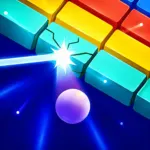
Google Block Breaker is a colorful arcade-style brick-breaking game built around a simple challenge: keep a bouncing ball above your paddle while using it to destroy every block on the screen. Move quickly, predict each return, and stop the ball from falling below the playing field.
The familiar brick-breaking formula becomes increasingly chaotic as power-ups and bonus items enter the screen. Multiball, larger paddles, extra lives, explosives, and shooting abilities can transform a careful round into a fast block-clearing chain reaction.
Success requires more than following the ball. Skilled players adjust the paddle’s position to influence the bounce angle, create openings through the brick wall, and send the ball behind the remaining blocks.
Play Google Block Breaker online for free on Lalo.games without installing an application. After chasing a new high score, continue exploring our Skill Games and Arcade Games collections for more quick browser challenges.
What Is Google Block Breaker?
Google Block Breaker is a modern paddle-and-ball arcade game inspired by the classic Breakout and Arkanoidformula. A paddle moves horizontally near the bottom of the screen while a bouncing ball repeatedly travels between the paddle, colorful blocks, and surrounding walls.
Your main objective is to break every block while keeping the ball in play. Missing a returning ball costs a life, while clearing the current arrangement introduces another challenge or group of blocks with increasing difficulty.
Google added its current Block Breaker game experience to Google Search in January 2025. Players could access it by searching for terms such as “Block Breaker” and launching the interactive brick-breaking game card.
The version available through Lalo.games is hosted by RocketGames.io. It recreates or distributes the Google Block Breaker experience for browser play but should not be described as a game developed by RocketGames on behalf of Google.
How to Play Google Block Breaker
Start the game and move the paddle beneath the bouncing ball. Use the Left and Right Arrow Keys on desktop, or drag and tap where touchscreen controls are supported.
The ball travels upward and breaks a block when the two collide. It then rebounds according to the bounce angle and continues moving until it strikes another object or returns to the paddle.
Position the paddle underneath the ball’s predicted landing point. Mastering ball control and visual tracking is essential. Do not wait until the ball reaches the bottom before moving, especially as the ball speed increases.
Catch useful items that fall from destroyed blocks. Different power-ups can create additional balls, enlarge the paddle, provide an extra life, trigger explosions, or let the paddle fire at blocks.
Clear the active brick pattern to advance to the next challenge. The brick-breaking game continues with new bricks and increasing difficulty while your score records how much progress you make.
Paddle, Ball, Blocks and Power-Ups
The Paddle
The paddle is your primary control tool in Google Block Breaker. Move it horizontally to prevent the bouncing ballfrom falling below the screen. Contact near the paddle’s center generally produces a straighter rebound, while contact closer to an edge can create a sharper bounce angle.
The Ball
The ball automatically travels between the screen boundaries, paddle, and brick field. Visual tracking and predicting its trajectory are more important than reacting to its current position.
Colored Blocks
Most colored blocks disappear after being struck, although some brick patterns may include tougher or special blocks. Clear the destructible bricks to continue to the next arrangement.
Multiball
Multiball adds one or more balls to the screen. This power-up can clear blocks rapidly, but tracking several trajectories makes paddle positioning more demanding.
Extended Paddle
The Extended Paddle power-up widens the paddle, increasing the safe area available for returning balls. It is particularly useful during fast rounds or multiball sequences.
Heart or Extra Life
The Heart or Extra Life power-up grants another life, allowing you to continue after a future miss. Catch it whenever doing so will not put the active ball at immediate risk.
Laser Blaster
The Laser Blaster power-up allows the paddle to attack and break blocks directly. Use it to target difficult corners while continuing to track the ball.
Explosive Bonus
Explosive power-ups such as TNT can destroy groups of nearby blocks and create fast chain reactions. They are most effective when activated around dense areas.
Power-up behavior can differ between versions of Google Block Breaker. Follow the icon and feedback shown in the current browser game rather than relying only on color.
Key Features
- Classic paddle-and-ball arcade gameplay
- Colorful Google Block Breaker-inspired brick patterns
- Fast and accessible game controls
- Multiple brick waves and challenging levels
- Score and high-score challenges
- Extra lives
- Multiball power-ups
- Extended Paddle power-ups
- Laser Blaster and shooting abilities
- Explosive block-clearing effects
- Increasing ball speed and difficulty
- Mouse and Arrow Key controls
- Touch controls on supported mobile devices
- HTML5 browser game
- No download required
- Fullscreen support
- Desktop, tablet, and mobile gameplay
Levels and Gameplay
Google Block Breaker is structured around repeated brick patterns and block-breaking challenges rather than a story campaign. Clear the visible pattern, and another group of colored bricks appears for you to destroy.
The official Google Block Breaker version begins with a colorful arrangement of 24 blocks organized in a 6×4 pattern. New brick waves appear as you continue playing, and collected power-ups make later waves more active.
The difficulty increases through faster ball movement, more demanding brick patterns, and the need to manage power-ups without losing track of the main ball.
There is no confirmed final level for the RocketGames-hosted version. The practical objective is to survive for as long as possible, clear more brick waves, and improve your high score.
Tips and Strategies
Watch the Landing Point
Do not chase directly underneath the bouncing ball. Use visual tracking to read its direction and predict its trajectory, moving toward the position where it will meet the bottom of the screen.
Break a Vertical Channel
Focus early shots on one section of the brick wall. Once a gap opens, the ball can travel behind the remaining colored bricks and create a powerful chain reaction with several hits before returning.
Use the Paddle Edges
Contact near the left or right edge of the paddle can alter the bounce angle. Use this deliberately when you need to send the ball toward a particular side.
Prioritize the Ball Over Power-Ups
A power-up is never worth losing the current ball. Only collect a falling item when the paddle can return to the ball’s landing path safely.
Control Multiball Chaos
During Multiball, focus on the balls closest to the bottom. Balls still bouncing behind the brick wall are temporarily safer.
Use a Wide Paddle With Multiball
An Extended Paddle power-up reduces the difficulty of tracking multiple returning balls. Combining these power-ups can keep Multiball active much longer.
Aim for Difficult Corners
Clear isolated corner blocks early when possible. These brick-breaking targets become harder to hit after the main brick field disappears.
Stay Near the Center
A central paddle position reduces the distance needed to reach either side. Move toward an edge only when the ball’s trajectory requires it.
Game Controls
Desktop Controls
- Left Arrow
- Move the paddle left
- Right Arrow
- Move the paddle right
- Mouse Movement or Drag
- Move the paddle where supported
- Left Mouse Button
- Launch the ball or interact with menus where supported
- Click
- Activate certain actions or begin a round
Mobile Controls
- Drag horizontally to move the paddle.
- Tap the Play button to begin.
- Keep your finger below the active area so it does not hide the ball.
Tips and Tricks
Pro Tip
Common Mistake
Strategy Tip
Developer Insight
Google Block Breaker becomes more strategic when paddle movement is treated as aiming rather than catching. The best players do not merely save the bouncing ball—they use bounce angles to decide which part of the brick field it should attack next.
— Lalo.games Editorial Team
Game Details
| Published on Lalo.games | July 25, 2026 |
|---|---|
| Last updated | August 7, 2026 |
| Genre | Skill, Brick Breaker |
| Technology or engine | HTML5 |
| Platform | Web browser |
| Game mode | Single-player |
| Supported devices | Desktop, laptop, tablet, and mobile |
| Supported browsers | Chrome, Edge, Firefox, Safari, and other modern HTML5 browsers |
| Mobile support | Yes |
| Fullscreen support | Yes |
| Language | Minimal language requirements |
Frequently Asked Questions
What is Google Block Breaker?
Google Block Breaker is a paddle-and-ball arcade game in which you bounce a ball into colorful blocks, collect power-ups, clear brick patterns, and try to achieve a high score.



0 Comments